 Jul 31 / 2026
You spent real money on your website. You hired someone, picked the fonts, wrote the copy, and hit publish. And yet, the leads are not coming in the way they should.
If the problem is not in your product or pricing or anything else, it might be time to check your layout.
Traditional website layouts, the kind that were built on 2010s design conventions, are quietly draining your conversions in 2026.
What Is a “Traditional Website Layout” and Why Is It a Problem?
A traditional website layout typically follows a formula: large hero image at the top, a navigation bar with five to eight items across the top, a services block in the middle, a stock photo gallery, a contact form at the bottom, and a generic call-to-action buried somewhere in the mix. Look at the page below.
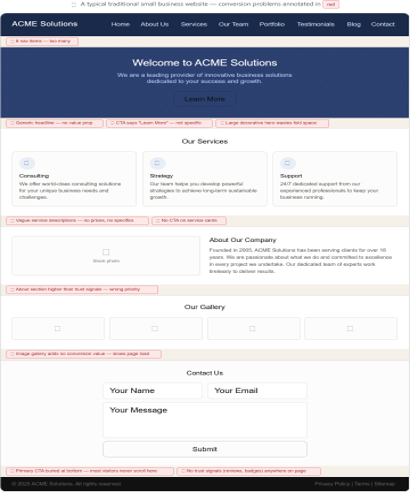
It looks professional. It checks the boxes. And according to data from over a decade of behavioural research, it is built for the way people used to browse the internet, not the way they do today.
So, what exactly is going wrong?
Let’s break it down, one conversion killer at a time.
Problem #1: Your Homepage Is Doing Too Much
The instinct to put everything on the homepage is understandable. You want people to know about your services, your story, your testimonials, your team, your blog, and your special offers. All at once. Immediately.
This is one of the most damaging mistakes a small business website can make.
The most common website design mistakes are crowded web design (84.6%), no call-to-action (38.5%), and hidden navigation (30.8%).
When a visitor lands on a cluttered homepage, their brain experiences what researchers call “decision paralysis.” They cannot identify what to do next, so they do nothing. They leave.
The fix: Identify one primary action you want a visitor to take on your homepage. Book a call. Get a quote. Sign up for a free trial. Design every element of that page to point toward that single action.

Problem #2: Your Navigation Menu Is a Maze
Your navigation bar is the most interacted-with element on your entire website. And most small business sites get it completely wrong.
Baymard’s 2025 benchmark found that 58% of desktop sites and 67% of mobile sites have mediocre or poor homepage and category navigation.
Traditional website layouts often cram navigation menus with too many options, vague labels like “Solutions” or “Resources,” and dropdown menus that open on hover (which is nearly unusable on a mobile phone). Users give you roughly 10 to 15 seconds to find what they need before they leave.
Nielsen Norman Group’s research on navigation menu size traces the ideal number back to short-term memory limits and basic scan ability: once you cross seven top-level items, users stop reading the menu as a coherent group and start hunting item by item. That hunting behaviour is exactly what drives mis-clicks and back-button use.
The solution is simpler than it sounds. Five to seven top-level items is the sweet spot for most small business sites. Use plain, descriptive labels like “Services,” “About,” “Blog,” and “Contact.” Clarity converts. Cleverness rarely does.

Problem #3: The “Above the Fold” Zone Is Wasted on the Wrong Content
The phrase “above the fold” comes from the newspaper industry, where editors placed the most important story in the top half of the front page, the part visible when the paper sat folded on a newsstand. The digital equivalent is simple: what does a visitor see before they scroll?
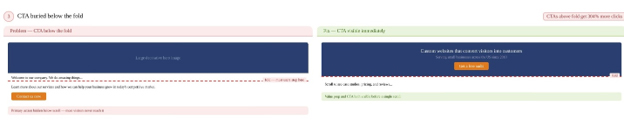
On most traditional business websites, that precious zone is consumed by a large decorative hero image, a slogan that sounds clever but communicates nothing, and a navigation bar. The actual value proposition, the “why choose us” and the “what to do next,” is buried below.
A website revamp that moved from a cluttered above-the-fold design to a clean, uncluttered one resulted in a 50% improvement in conversions.
The rule in 2026 is straightforward: your headline, your sub-headline explaining what you do and who you do it for, and your primary CTA button should all be visible the moment someone lands on your page, on any device.
Problem #4: Your Website Was Designed for Desktops, and Your Customers Are on Phones
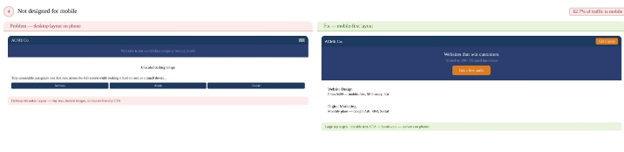
If your website was built without a mobile first approach, you are handing away more than half your traffic.
Mobile devices accounted for approximately 62.45% of all internet traffic worldwide, underscoring the necessity of adopting a mobile-first design approach.
But mobile optimisation is not just about making things smaller. It is about rethinking the entire layout for a different context, a smaller screen, a thumb instead of a mouse, a distracted user often browsing on a commute or between tasks.
Navigation issues cause 30 to 40% of mobile usability problems, and users usually leave if they find it even slightly tiresome.
Websites optimised for all screen sizes see an 11% higher conversion rate than those that are not. If someone lands on your site from their phone only to find text overlapping or navigation that does not work, they will likely abandon it immediately.
Problem #5: Your Page Takes Too Long to Load
Speed is not a technical problem. It is a conversion problem.
A slow-loading website is the top reason visitors leave a site, cited by 88.5% of those who abandon. It is followed by a non-responsive website at 73.1%, bad navigation at 61.5%, outdated design at 38.5%, and poor content structure at 34.6%.
The numbers on load-time and conversions are eye-opening. A page that loads in one second has an average conversion rate of almost 40%. A page with a two-second load time has a 34% conversion rate, while a page loading in three seconds has a 29% conversion rate.
Traditional website layouts are often loaded with elements that slow things down: full-width autoplay videos, large uncompressed images, carousels that load multiple images at once, and excessive third-party scripts. Every second of delay is revenue walking out the door.

Problem #6: You Are Ignoring Where the Human Eye Actually Goes
This is where things get genuinely fascinating, because the science of how people read websites was settled decades ago, and most businesses are still designing against it.
In one of the most cited eye-tracking studies in UX history, the Nielsen Norman Group tracked 232 users viewing thousands of different web pages and identified a consistent pattern. Users read in an F-shaped pattern: they read in a horizontal movement across the upper part of the content area, then move down the page and read across in a second, shorter horizontal movement, then scan the content’s left side in a vertical movement.
The uncomfortable implication most agencies will not tell you is that the bottom right quadrant of your webpage is a graveyard. Your call-to-action buried there? Your testimonial carousel in that corner? Statistical dead zones.
According to research cited by CXL, the average user spends 57% of their page viewing time above the fold. By the time they reach the bottom third of a page, engagement has dropped by more than 74%.
The traditional layout puts your most persuasive content, your testimonials, your guarantees, your pricing, exactly where users have already mentally checked out.

Problem #7: Your Website Is Not Built to Be Found by AI
In 2026, an increasing share of search activity happens through AI-driven tools, including Google’s AI Overviews, ChatGPT, Perplexity, and voice assistants. These tools do not just rank websites by keywords. They look for websites that answer questions directly, clearly, and in a structured way.
A traditional website layout, built around dense paragraphs of marketing copy, does not lend itself to being cited by AI models. Websites that structure content around direct Q&A, with clear headings, concise answers to specific questions, and properly formatted structured data, are far more likely to appear in AI-generated responses.
If your layout buries answers inside long paragraphs without subheadings or structured formatting, you are invisible to an increasingly large slice of how people search.
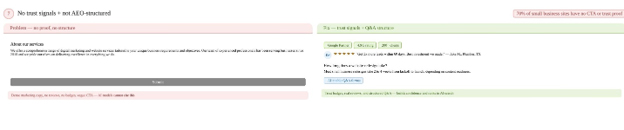
What a High-Converting Website Layout Actually Looks Like in 2026
Based on the latest research, here is what separates websites that convert from those that do not.
LBN Tech Solutions
There is no neutral website. Every design choice – where the CTA sits, how many navigation items there are, how fast the page loads, what a visitor sees before they scroll- is either moving a potential customer toward a conversion or pushing them away.
The good news is that these are all solvable problems. You do not need to rebuild your website from scratch. You need to rebuild it with purpose.
We at LBN Tech Solutions have been helping small businesses across the United States do just that. We build websites that do not just look good, but actually convert. If your current website is not generating the leads your business deserves, get in touch with our team today.
Frequently Asked Questions
- Why is my website getting traffic but not generating leads?
A website can attract traffic but still fail to generate leads when visitors cannot quickly understand what you offer, why they should choose you, or what action to take next. Cluttered layouts, weak CTAs, slow loading and confusing navigation are common conversion barriers.
- What makes a website layout high converting?
A high-converting layout gives visitors a clear value proposition, simple navigation, visible CTA, relevant social proof and an easy path to conversion. Important information should appear early rather than forcing users to search through the page.
- Should a call-to-action be above the fold?
Yes. Your primary CTA should generally be visible without requiring visitors to scroll. Depending on the business, this might be Get a Quote, Book a Consultation, Call Now, Start Free, or Contact Us, with the CTA repeated naturally further down the page.
- How does mobile-first website design improve conversions?
Mobile-first design makes navigation, reading, forms and CTA interactions easier on smaller screens. Since a large share of website traffic now comes from mobile devices, a frustrating mobile experience can directly contribute to abandoned visits and lost leads.
- Can website speed affect leads and sales?
Yes. Slow pages create friction before visitors even engage with your content. Optimising images, reducing unnecessary scripts, improving hosting performance and removing heavy design elements can improve both user experience and conversion opportunities.
- How can small businesses make their websites more visible in AI search?
Small businesses can make content easier for AI search systems to understand by using descriptive headings, direct answers, well-organised service information, consistent business details and relevant structured data. Strong SEO fundamentals should remain the foundation rather than treating AEO or GEO as replacements for SEO.
Categories
- Listings, Reviews, Mentions: Which Signal Matters Most to AI?
- Ads in ChatGPT: What They Are, How They Work, and What It Means for Small Businesses
- Can AI Recommendations Be Manipulated? What Small Business Owners Need to Know in 2026
- The AI Content Overload Problem: How Smart Brands Win Without Posting More in 2026
- The AI Layer of Social Media: What’s Really Happening Behind Every Scroll
- Reddit Marketing 101: An Intro to the Platform
- LLMs.txt and Google Search: What Marketers Really Need to Know in 2026
- Can AI Content Rank on Google? Myths, Facts, and New Updates in 2026
- Schema Markup: The Hidden Signal Helping Content Rank, Get Cited, and Show Up in AI Overviews
- AI Overview Optimisation: The New Frontier of SEO (and How We’re Winning It)
- Zero-Click Searches and Their Impact on Content Writing and Blogging Services
- From Keywords to Intelligence: The SEO–AI Evolution by 2026
- Is SEO Really Dead, or Has It Simply Evolved into Fuel for AI?
- The “See It, Want It, Buy It” Loop: How Fast Decision Cycles Are Quietly Rewriting Marketing (And What Small Businesses Must Do Now)
- Why Monthly Newsletters Still Work (And How to Make Yours Stand Out)
- The Ultimate Guide to Content Repurposing – The Underrated SEO Factor
- How Does Video Content Help Improve SEO?
- Top 12 Reasons Why Your Website Needs a Blog Corner
- Difference Between Copywriting and Content Writing
- Content Marketing – A Modern Guide for 2023
- What Is the Difference Between Content Marketing and Content Strategy?
- How to Write Compelling Headlines in 3 Steps
- Marketing in the Attention Economy: Why Capturing Attention Is Harder Than Ever (And What Smart Businesses Are Doing About It)
- Google Kills &num=100: Good or Bad for SEO?
- Brand Loyalty – Why Does It Matter and How to Build It?
- 5 Ways to Convert Your Visitors into Customers
- How to start a digital marketing agency from scratch and run it successfully? | Part 2
- How to start a digital marketing agency from scratch and run it successfully? | Part 1
- Digital marketing tips for preschool owners
- What are brand pillars, and why do they matter?
- How to Get the Results You Want Through Your Digital Marketing Plan?
- Demystifying the Debate Around Influencer Marketing (How to Do It Correctly)
- How to Use Customer Service as an Online Marketing Strategy
- The Importance of Commenting in Forums for SEO
- What Is Moltbook? All Your Questions Answered About the Strange New Social Media for AI
- 4 Digital Marketing Incidents Everyone’s Talking About: Outages, Scams, Malware & Analytics Chaos
- Google Algorithm Updates – March 2024
- Google Ranking Algorithm Updates – February 2024
- Top Search Engine Marketing Tools to Use to Save Time and Money – Part 2
- Google Ranking Algorithm Updates – September & October 2023
- Top Search Engine Marketing Tools to Use to Save Money and Time – Part 1
- Google Ranking Algorithm Updates – August 2023
- Google Ranking Algorithm Updates – July 2023
- Google Ranking Algorithm Updates – June 2023
- Google Ranking Algorithm Updates – May 2023
- 10 Cool Things You Could Do with ChatGPT
- ChatGPT Is at Capacity Now – How to Fix This Error?
- ChatGPT – Is It the Future or Just the Latest AI Fad?
- 5 Ways Technology Might Be Blocking Your Business Progress
- Trends That May Shape the Future of Digital Marketing
- The Significance of Meta Description in 2024
- What are the 9 basic rules Google follows for Featured Snippets?
- What is agile marketing?
- How will Core Web Vitals enhance SEO in 2024?
- Digital Marketing Trends for 2024
- What Are the Major Elements of an Ideal E-Commerce Website?
- Ecommerce Website: Benefits, Working and Development Process
- Choosing the Right E-Commerce Web Development Company: A Comprehensive Guide
- E-Commerce Site Search – Best Practices to Increase Conversion (Part – 2)
- E-Commerce Site Search – Best Practices to Increase Conversion (Part – 1)
- What Is E-Commerce Merchandising and How Can It Help Improve Sales?
- Top 5 Reasons Why Your Business Needs a Website in 2023
- How to Write a Product Description for eCommerce Websites
- Types of Ad Fraud and Invalid Traffic: A Complete Guide for Businesses
- Meta Andromeda Explained: Why Small Brands Need to Rethink Meta Ads Now
- Google’s New ‘Sponsored Results’ Update – What Businesses Should Know Now
- How to Create a Demand Generation Campaign in Google Ads
- Demystifying Demand Gen Ads: Understanding the Power of Awareness and Engagement
- Why Is Search Engine Marketing Important?
- Google Ads Checklist for 2024
- Difference between Organic and Paid Search Results
- Essential Rules and Strategies for Effective Healthcare Content Marketing
- Healthcare’s Content Revolution: Statistics and Strategies for Reaching Today’s Patients
- Healthcare Marketing: Loyalty-Building Techniques and Basic Healthcare Marketing Content Ideas
- The Essential Guide to Content Marketing for Modern Healthcare Organizations
- Healthcare Marketing through the Ages: The Vital Role of Digital Transformation
- Setup GA4, Search Console & Tag Manager with Expert Help from LBN Tech Solutions
- Get Found on Facebook, Instagram, X, and LinkedIn – Professionally Set Up by Experts
- Brand Yourself with Every Email – The Power of a Custom Email Signature by LBN
- Why You Need a Domain and Branded Email – Even Without a Website
- The Pareto Principle of SEO: Why Small Businesses Should Stop Trying to Fix Everything at Once
- 9 Beginner Mistakes Most Small Businesses Make in SEO
- 11 Actionable On-Page SEO Factors You Need to Know
- Cracking the Code: Mastering On-Page SEO for Website Excellence
- Off-Page SEO – Best Short-Term and Long-Term Strategies to Employ
- Off-Page SEO Ranking Factors That Everyone Should Know About
- Off-Page SEO – What Is It and How Can You Get the Best Out of It?
- Top 5 SEO Mistakes to Avoid
- What to Expect from a Professional SEO Company?
- What is the Role of SEO in the Web Design/Development Process?
- Is Trying To Rank SEO without an SSL (HTTPS) Pointless?
- How We Brought Down the Bounce Rate from 93% to 5% (Case Study)
- How to Rank Higher on Voice Searches
- The ‘Proof Loop’: How Customers Cross-Check Businesses Before Choosing You
- Best AI Tools for Small Business Marketing in 2026: The Complete Guide for Owners Who Are Tired of Being Outspent
- 11 Reasons Why Having an E-commerce Website Is More Important Than Ever
- 5 Mobile Marketing Techniques That Can Grow Your Business
- Lead Generation Basics for Small Business Owners
- How to Conduct a Competitive Analysis?
- How to Win Social Media Without Posting Daily
- How TVK won Tamilnadu in 2026: The strategy, the story and the business lessons
- Empowering Women in Digital Marketing: Job Opportunities, Career Paths, and Top Interview Questions Answered
- How to Market using Social Media for Different Generations
- Tips to Handle Digital Branding Like an Expert
- WhatsApp Ads Decoded: Everything You Must Know About This Marketing Game Changer
- Digital Marketing vs. Digital Branding – What’s the Difference?
- Website vs. Social Media: Is a Website Still Necessary for a Business?
- What Should Small Businesses Post on Social Media? (A Complete Guide)
- The making of the first ever Digital Women Economic Forum
- Schema Markup: The Hidden Signal Helping Content Rank, Get Cited, and Show Up in AI Overviews
- Schema Mark-up in SEO: A Guide to Types, Benefits, and Importance
- How to Track Website Calls and Email Clicks in GA4 Using Google Tag Manager
- How to Set Up Google Tag Manager: A Step-by-Step Guide
- What is Google Tag Manager? How does it work and what are the Benefits of using Google Tag Manager?
- The Ultimate Guide to Profile Page Structured Data
- Mastering Schema Markup: Unravelling the Secrets of Schema, Supported Formats, and Implementation
- Reasons Why Google May Penalize Your Website
- Mobile-First Design vs. Responsive Design – What’s the Difference in 2026?
- Top 10 CMS Platforms for Website Design and Blogging
- Website Redesign Mistakes to Avoid – Professional Website Redesign Services
- 10 Clear Signs Your Website Needs a Redesign and Why It’s a Smart Investment
- The Importance of UI/UX Design in Web Development
- What Are the Phases Involved in Web Development?
- A Beginner’s Guide to Web Development
- What Is CMS and How Can It Be Used in Website Development?
- Why Should You Consider Redesigning Your Website?
- What Is the Process of Web Design and How Does It Differ from DIY Solutions?
- Web Design Trends of 2026 – What Small Businesses Need to Know